Weebly Tool Review | Scripted
You'd be hard-pressed to find a modern business that didn't have an online presence, but that doesn't mean getting online is easy. Website builders like Weebly seek to make the process of creating and hosting your own website much less confusing than doing it from scratch, and you'll also find it more affordable, as long as you can bear the compromises.
What to Consider When Looking for a Website Solution

If you were to create and host your website the "traditional" way, you'd need three things: a domain, a hosting service, and a content management system. These three things can get confusing, as you may find all of them in a different place, and you'd need to connect them together for your website to actually be accessible and functional on the web.
The first step in creating a website is registering a domain name through a domain registrar. Some of the most popular include GoDaddy, Name.com, and NameCheap. Once you have purchased the domain, for an average of $9.99/year (assuming you opt for a .com domain name), you then need to find a hosting service so people can access your domain.
Many domain registrars offer to host, but the convenience may cost -- not just in higher rates, but in less security, slower load speeds, or low caps on traffic or bandwidth. In other words, if you choose the easy way, you'll likely compromise the performance of your website. Regardless, the final element you require is a CMS (Content Management System), which gives you the backend and frontend, allowing you to access, design, post on, and update your website. A popular CMS is WordPress.
Once you have an idea of how a website comes together, it's even easier to see why so many businesses choose Weebly. With Weebly, you can buy your domain through them (or bring your own, if you already own one) and they will act as both your hosting provider and CMS. The issue? Weebly's CMS may not offer as many features as you desire, and the hosting may not be as fast, reliable, affordable, or secure as you'd like.
Features and Benefits of Weebly
Weebly is a "website builder," which means it's a tool dedicated to being your simple, all-in-one solution. You can start for free by using a .weebly subdomain, which will allow you to play around with the tool and explore its features and limitations. However, for SEO purposes and marketing reasons (i.e., your company's brand reputation), you'll eventually need to purchase a custom, white-label domain, meaning you'll need to make the move from yourbrand.weebly.com to yourbrand.com.
In any case, Weebly's big selling point is simple: It's supposed to be fast and easy to get your website online, and it certainly delivers in those aspects. Weebly's templates and easy-to-use website builder allow you to get the perfect layout for your website in a matter of minutes. They even offer starter guides if you'd like input on how you can create the best possible website using their tools.
Once your website is set up, Weebly also offers eCommerce tools, allowing you to add a store to your Weebly website so you can start listing products, accepting orders, and earning money. Integrated marketing tools also help you take advantage of Facebook and email marketing. So, what does Weebly lack? Let's take a closer look at the pros and cons.
Pros of Weebly
- By far, the biggest "pro" of using Weebly is that you can get your website online with no need for any experience in website creation, hosting, or domain name registration. You can get started for free, play around with Weebly's tools, and have your website up and running in no time.
- Weebly's beautiful templates and easy website builder make creating an attractive website a breeze, although you don't want a website that looks like all the others, so spending time customizing your template a bit is a must-do.
- Being able to start for free allows anyone to try their hand at building a website and an online presence, as long as you realize that Weebly may hold you back in some facets, like with SEO.
Cons of Weebly
- If you stick with the "free" domain Weebly gives you, it will be extremely hard to rank your website and enjoy organic traffic. What's more, you'll also experience difficulty building a reputation for your brand. This means you're virtually going to have to invest in one of Weebly's branded plans.
- Weebly knows who they're targeting: Businesses who don't have the time to spend learning about registering or hosting their own domains, which means they're able to charge a premium. The features and hosting you're getting from Weebly is going to cost you more than if you found a host on your own.
- One of Weebly's biggest selling points is that you can get your website up-and-running right away thanks to their website builder, but that means you're missing out on the expansive website features that content management services such as WordPress have to offer. Beyond basic graphics and writing, you'll struggle to really make your website unique or offer the functionality and user experience visitors may expect.
Weebly Plans & Pricing
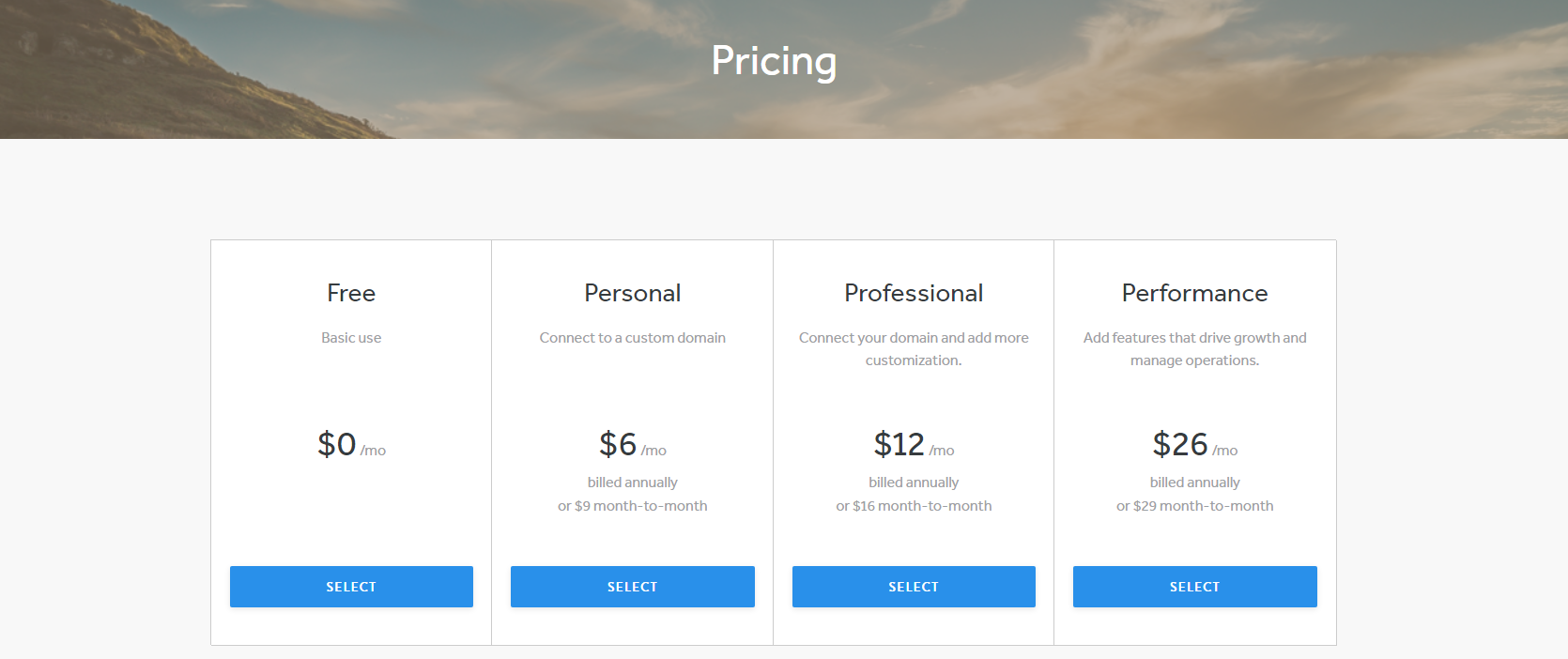
Anyone can start using Weebly for free, but if you stick with it, you're almost certainly going to end up investing in a paid Weebly website.
Free
Ideal for basic use, like your wedding or personal website, the Weebly free plan allows you to embed things from a third party (like a YouTube video) and lets you create an online store with a shopping cart feature. You can also get help via the community forum or with chat/email support from the Weebly team.
Personal
Starting at $6/month if you pay annually, the Personal plan allows you to connect your own custom domain, but realize that you'll have to pay annually to register that domain separately. This means you're really just paying Weebly to host your website, and there are a number of dedicated hosting services in this price range.
With Weebly's Personal plan, you'll get all of the features of the Free plan, along with a shipping calculator and digital goods if you open an online store. Plus, you can send pop-up notifications to site visitors to help you market.
Professional
Starting at $12/month if you pay annually, the Professional plan allows you to build a fully branded and professional website for your business. This plan includes a custom domain, meaning Weebly is acting as both your domain registrar and your host. Plus, they offer unlimited storage, advanced stats, the ability to remove Square's branding, and password protection. The only other difference is the addition of phone support if you need help.
Performance
The Performance plan is aimed at businesses looking to grow, especially in the eCommerce space. This plan starts at $26/month when you pay annually, and includes a few more selling features than the Professional plan, such as the ability to send emails to users who abandon their shopping carts and the option to let visitors pay via PayPal and leave reviews on items. Plus, you can print shipping labels with ease for orders made through your website.
Customer Reviews

"Apart from its lack of sitewide undo functionality and photo storage, Weebly remains one of the easiest site builders to use. It offers a number of free options and is one of very few such services we've reviewed that let you export standard site code. The responsive designs look great, but they limit design customizability. Our Editors' Choice website builders Duda and Wix edge it out, however, because they are more intuitive and full-featured." - PC Mag
"Weebly is the best builder for small business sites and portfolios. It’s easy to use and comes packed with apps and features to help grow your site, from SEO to e-commerce. You can build a simple, stylish site with Weebly’s drag-and-drop editor, and it’s a great choice for portfolios, blogs, online stores, and business sites." - Lucy Carney
Power Your Content Marketing
If you think W
Cruise Control puts your content marketing into the hands of a professional strategist, who will plan, prepare, and execute your content with the help of Scripted's talented writers. The result? Hands-off content creation that improves your rankings, drives engagement and helps you build your brand's reputation. Ready to learn more about Cruise Control? Take a tour of all its features today.