
Mighty Meta Tags, How to Use Them, and How to Audit Your Content for SEO Success

Search engine friendliness is a must when it comes to making sure your blog post reaches the right eyes. Luckily, meta tags are there to help you achieve that. These small tags placed within the HTML code of a website give search engines additional contextual data about each page. It’s important to know how to use meta tags properly in order to ensure that your content is properly indexed and ranked by search engines.
What Exactly Are Meta Tags?
Meta tags are pieces of HTML code that contain information about the content of a webpage, including keywords and descriptions. Search engines use meta tags to help categorize and rank webpages, enabling them to return more relevant results when a user performs a search. Meta tags can also be used to set directives for browsers, such as redirecting users to new pages or loading specific content like page titles and descriptions. Furthermore, meta tags play an important role in defining how ads are served on a page. They contain information regarding the page's topic, allowing advertisers to ensure their ads will be tailored to fit related topics. Without meta tags, it would be difficult for search engines and advertisers to accurately identify their services' target audiences.
For best practices, there should always be two critical meta tags: the title tag and the meta description.
The Title Tag
The title tag, also known as the SEO title, tells search engines what the name of your article is and provides a concise overview of the content at hand.
The <title> tag is one of the most critical components when it comes to Search Engine Optimization (SEO). It's usually the first thing visitors will see in search engine results and appears as the blue link.

The HTML element should be placed inside the <head> section on a web page and is made up of 50 to 70 characters. Moreover, you should not use similar <title> tags across multiple pages on one domain.
When crafting your titles, take advantage of the fact that Google considers clickthrough rates in its algorithm. If it's catchy and grabs the attention of viewers, you could potentially move up in rankings. If you are looking for inspiration for captivating headlines, read this article from Smartblogger.
The Meta Description
The meta description should provide a detailed snapshot of what users can expect from your content in terms of information or entertainment.
Keep your description under 160 characters, but also provide enough information, so potential visitors know your page is relevant to their search. Like the title tag, your meta description should be unique to each page.
In the image above, the meta description reads, "Hire Copywriters and Freelance Writers - Choose from thousands of professional copywriters - highly vetted for your industry. 100% Quality Guaranteed."
With these two elements properly set up, search engines can more accurately direct users to your blog post.
Meta tags that aren't essential but should be considered include:
Open Graph Meta Tags
These tags help control how your website is presented when shared on social media, such as Facebook or Twitter. They allow users to add thumbnails, images, and descriptive text to make the shared link more engaging.
Additionally, open graph meta tags help ensure the site URL and other relevant information are correctly displayed by social media platforms when visitors try to share a link. Ultimately open graph meta tags make it much easier for your website content to be successfully shared across various platforms.
Canonical Meta Tags
Canonical meta tags are a powerful SEO tool used by web admins and marketers to help protect the search engine ranking of their pages. They can be added to a page's head section, allowing search engines to understand the content relationship among multiple versions of the same URL. This helps those pages find their way into search engine results while protecting against any potential penalties by Google or other search engines due to having duplicate content.
Meta Tags on WordPress
Ready to give your WordPress site the optimization it deserves? The best way to ensure you've got all of your meta tags covered is with a plugin like Yoast SEO. Installation is relatively straightforward, and once you've done that, you can use their audit feature to check for any potential missing or redundant <title> tags and meta descriptions.
For a more comprehensive performance audit, check out Semrush - their powerful website crawl feature will uncover any issues quickly and easily.
How to Install the Yoast SEO Plugin on WordPress
- Log in to your WordPress admin.
- Go to Plugins > Add New on the left navigation bar.
- Search plugins for "Yoast SEO" and click Install Now.
- Go to Plugins > Installed Plugins and activate Yoast SEO.
- After activating the Yoast SEO plugin, a notice to start the Yoast SEO configuration wizard will appear. Complete the configuration wizard to set up the plugin for your site.
When you're editing a page or post on WordPress with Yoast SEO installed and activated, you will see the Yoast SEO dialog below the edit text dialog.
How to Audit a Blog Post Using Yoast SEO
When you're editing a page or post on WordPress with Yoast SEO installed and activated, you will see the Yoast SEO dialog below the edit text dialog.
On the Keyword tab, view the snippet preview of what your page or post will look like in search results. Leverage this feature to determine if your title is too long or too short and if your meta description makes sense in the context of the search result. These steps will help improve search rankings and the clickthrough rate for your content.
Enter your main target keyword in the Focus keyword field to get an analysis of how optimized your content is for search engine results. It checks to make sure your content follows best practices for SEO, like including an image with an alt tag that contains the keyword, writing a meta description that includes the keyword, being an appropriate length, using subheadings, etc.
The analysis will list these aspects and grade your content across each one. Address any issues marked by the red and orange dots by making the appropriate tweaks to your content. Then, in the Content tab of the Yoast SEO Plugin, review the readability analysis and address the issues marked by the red and orange dots.
How to Audit Your Site with Semrush
The first step is to create a project on the domain you would like to audit. Once created, select the "set up" button in the Site Audit block of the project interface.
Domain and Limit of Pages
The first part of the setup wizard will take you to Domain and Limit of Pages, where you'll have the option to customize your settings or jump right in with Semrush's default settings. Either way, it's easy to make changes later on. After you complete your initial setup, feel free to re-run your audit and fine-tune the area of the website you'd like scanned.
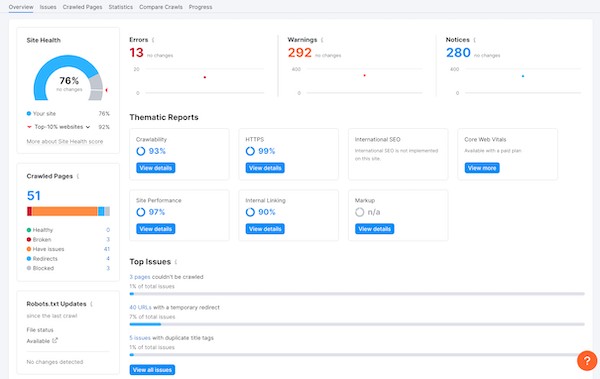
Once you have successfully set up your project, SEMrush will run an automated audit on the specified pages of your website. The report will include recommendations for improving page speed, SEO errors, and other issues that can impact rankings.
Here is what a finished site audit looks like:
Why SEO is So Important
SEO, or Search Engine Optimization, is one of the most critical marketing strategies for businesses today. SEO allows a company to increase its visibility online and draw more traffic to its website.
SEO helps businesses rank higher in search engine results pages, meaning that more people are likely to click on their website than on lower-ranking sites.
Additionally, SEO tactics ensure that the content of a website is optimized for search engines so customers can easily find the information they need.
When used strategically and appropriately, SEO can be an excellent tool for businesses seeking increased organic traffic and better customer engagement.
Hire a Performance & Optimization Team
Scripted's Performance & Optimization team is here to help you maximize your visibility and rankings in search engine results pages. By monitoring your SEO performance, you can quickly identify areas of need such as organic traffic, bounce rate, clickthrough rate, keyword ranking, backlinks page speed and conversion rates.
We will help you craft better content with ideal keywords while increasing your page speed and conversion rate. This will ensure that your standing in the search engine rankings continues to rise.
Let Scripted's Performance & Optimization team equip you with the right strategies to make sure the right people see your website.
Start your Scripted trial today.